
How to Wipe Your Phone Before Selling It: A Simple Step-by-Step Guide
A new phone is one of the most common gifts and upgrades at this time of year. That usually leaves an old one in a drawer, or on its way to a buyer, a trade-in counter, a friend, or a recycling bin. Before it leaves your hands, it is worth taking a few minutes to make sure your messages, photos, passwords, and accounts don’t go with it.

The good news is that this isn’t difficult. This guide explains what to do before you erase your phone, how to erase it properly, what to do with the SIM and memory cards, and what to check afterwards. It is based on guidance from the UK National Cyber Security Centre (NCSC) and the US Federal Trade Commission (FTC). Menu names and steps differ from one phone to another, so I describe the steps in general terms and name no brands. Always check your phone maker’s own instructions for the exact buttons. This is general information, not professional security advice.
Why Wiping Your Phone Matters
Your phone holds more than you remember
Think about what is on your phone right now. The FTC says a factory reset erases personal information such as account numbers, passwords, messages, videos, and photos. The NCSC adds that erasing removes your contacts, browsing history, saved Wi-Fi details, and installed apps. If any of that stayed on a phone you sold, a stranger could see it.
Two jobs, not one
Getting a phone ready to sell is really two separate jobs. The first is to keep what you want: your photos, contacts, and chats. The second is to remove everything you don’t want to share. Mixing them up is the most common mistake. If you erase first and back up second, the backup is gone for good.
A realistic view of the risk
Most buyers aren’t looking for your data. Still, a few minutes of care costs nothing, and the harm if you skip it can be large, from someone seeing private photos to someone trying to get into your accounts. The NCSC adds a caveat worth knowing: a determined expert with specialist tools may still be able to recover some data after a standard reset. For most people selling a phone, a proper reset is enough. If your phone has held extremely sensitive information, the NCSC points readers to its separate guidance on secure sanitisation, which is written mainly for organizations.

Before You Erase: Get Ready
Step 1: Back up what you want to keep
Both the NCSC and the FTC put this first. The FTC puts it simply: “First, back up your phone so you have a copy of your information.” Your phone maker’s instructions explain how to back up to your account online or to a computer. Then check that the backup really worked. Look for your photos, contacts, and messages before you move on.
Step 2: Make a list of the accounts you use
The NCSC points out that your phone may keep you logged in to services without asking for a password. Once the phone is erased, you will need your login details again. Take a few minutes to note which services you use, such as email, banking, shopping, and social media, and make sure you can sign in to them on your new phone.
Step 3: Check your login codes will still work
Many accounts send a code to your phone, or use an authenticator app on it, to confirm it’s you. The NCSC advises checking that this works on another device before you erase the old one. The FTC adds that if you use an authenticator app, you may have to reactivate it on the new phone, and that if you’re not keeping your phone number, you should update it on any account that uses it to identify you. Doing this before the wipe means you won’t be locked out of an account afterwards.
Step 4: Plan for your smart home devices
If your phone controls things like a doorbell camera, lights, or a thermostat, the NCSC suggests setting up another way to manage them first. Otherwise you could lose control of them the moment you erase the phone.
Step 5: Unlink the phone from your accounts
The FTC’s 2025 advice for people upgrading says to remove the old phone from the trusted-device lists for any multi-factor authentication, and then to confirm it is no longer connected to your online accounts. Many phones also have a “find my device” or anti-theft feature tied to your account, which can stop a buyer from using the phone if it is not turned off first. The sources I read don’t cover that feature in detail, so look in your phone maker’s instructions for how to switch it off and sign out of your account. This is the step people most often miss, and it can leave a buyer with a phone they can’t set up.
How to Erase the Phone
Use the built-in erase option
Every modern phone has a way to erase everything and return to its original state. The NCSC calls it an erase-everything option or a factory reset, and notes that the name varies by device. It is usually found in the settings menu under a heading about reset, backup, or system. The FTC says the reset wipes your contacts, messages, photos, videos, and your browsing and search history.
Say no to “keep my files”
The NCSC has a clear instruction here. If you are offered the choice to keep your personal files, don’t select it when you’re selling, trading in, or giving the device away. The whole point is to remove them.
Don’t skip the confirmation steps
The phone may ask for your passcode or account password before it lets you erase it. That is a safety feature to stop someone else wiping it. Follow the prompts until the phone restarts and shows its first set-up screen, as if it were brand new.
A note on encryption
Many modern phones scramble their stored data by default. The NCSC’s guidance for organizations says that on devices with encryption, a manufacturer’s factory reset normally deletes the encryption keys, which makes the data unreadable. It adds that this can’t guarantee that everything is unreadable on every device. Whether your phone is encrypted depends on the model, so I can’t say it for yours. The practical point is simple: use the official reset, don’t try to delete files by hand, and don’t rely on dragging photos to the trash, which does not remove them properly.
What if the phone is broken?
If the screen is cracked or the phone won’t switch on, you may not be able to run the reset yourself. Neither source I read covers this case in detail. A repair shop, your phone maker’s support, or your network provider may be able to help. If you can’t wipe it, think twice about selling it, and consider recycling it through a trusted service instead.
Don’t Forget the SIM Card and Memory Cards
The SIM card
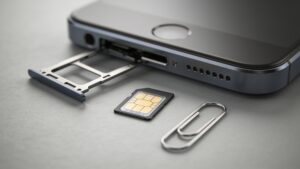
The FTC notes that a SIM card may hold personal information. If you’re keeping your phone number, you can move the SIM to your new phone, and your network provider can explain how. If you won’t reuse it, the FTC advises destroying it. Many phones now use a digital SIM instead of a physical one, so check your phone maker’s instructions or ask your provider whether yours needs to be removed in the settings.
Memory cards
If your phone has a removable memory card, take it out. The FTC specifically lists SD cards as something to remove, and the reset may not touch what is stored on them. Keep the card for your new phone if it fits, or erase and destroy it.
Cases, accessories, and watches
This part is my own suggestion, not from the sources: if your phone is paired with a smartwatch, wireless earbuds, or a car, unpair them before you sell it. Take off any case, screen protector, or stickers with personal details on them, such as a name or an address.
Keep the packaging and charger?
That is up to you. A buyer will usually pay a little more for a charger and box, but those are not a security matter.

Selling, Trading In, Donating, or Recycling
Choose a sensible way to hand it over
Selling to a stranger, trading in at a shop, giving to a friend, and recycling are all fine, as long as the phone has been wiped first. The FTC says that if you aren’t going to trade in, sell, or give away your phone, you should recycle it. It points to the US Environmental Protection Agency and suggests checking with the manufacturer, your wireless provider, or a local electronics store. In Europe, recycling schemes vary by country, so check your local council or a recognized electronics retailer.
Be careful when selling to a stranger
This is general advice, not from the sources I read. Meet in a public place if you can, don’t ship the phone before you have been paid, and be wary of buyers who overpay or ask to be paid in an unusual way. Our earlier guides on scams cover the common signs.
Check the phone has been wiped
After the reset, turn the phone on and look at the first screen. If it asks you to choose a language or connect to Wi-Fi, as a new phone would, the reset worked. If you see your name, photos, or a lock screen asking for your passcode, it didn’t.
If you are buying second-hand
The NCSC gives a useful tip for buyers: do a factory reset on any second-hand phone you receive, to remove the previous owner’s data and put it into a clean state. It also advises avoiding phones that the manufacturer no longer supports, or whose support is ending soon, because they miss security updates. When you turn on your own phone, set a screen lock and switch on automatic updates and backups.
A short checklist
- Back up your photos, contacts, and messages, and check the backup works.
- Note the accounts you use and make sure you can sign in on your new phone.
- Check your login codes and authenticator app will work on the new phone.
- Set up another way to control any smart home devices.
- Unlink the phone from your accounts and switch off any find-my-device feature.
- Use the phone’s own erase option, and don’t choose to keep personal files.
- Remove the SIM card and any memory card.
- Unpair watches, earbuds, and cars.
- Turn the phone on to check it shows the first set-up screen.
- Recycle the phone if you’re not passing it on.
Wiping a phone takes about half an hour, most of it spent on the backup. Do the steps in order, check each one, and your old phone can go to its next owner without taking your private life with it.